Electronics Upgrade for Living Room: Transform Your Entertainment Space in 2026
You’ve been binge-watching your favorite shows on a TV that’s seen better days, and your sound system consists of the built-in speakers that came with it. Your living room deserves better, and so do you. An Electronics Upgrade for Living Room isn’t just about buying the latest gadgets—it’s about creating a space where movie nights feel like cinema experiences and game days become legendary.
Maybe you’ve been scrolling through photos of beautifully designed media walls and wondering how to achieve that sleek, organized look in your own home. The good news is that upgrading your living room electronics doesn’t require a complete renovation or a tech degree. With the right planning and a few smart choices, you can create an entertainment setup that looks stunning and performs even better.
Let’s walk through everything you need to know to give your living room the electronics upgrade it deserves.
Table of Contents
What You’ll Need to Get the Look
Before you start shopping, it helps to know what elements work together to create that polished, modern look you’re after.
Your main components will include a television that fits your space properly, a sound system that matches your room size, and streaming devices that give you access to all your favorite content. You’ll also want to think about how you’ll display and organize everything.
Consider these essential elements:
– TV stand or media console that accommodates your screen size with room for components
– Cable management solutions like cord covers, clips, or sleeves
– Surge protector with enough outlets for all your devices
– Streaming device or smart TV platform
– Soundbar or speaker system appropriate for your room dimensions
– Ambient lighting such as LED strips or bias lighting for behind the TV
– Universal remote or smart home controller to simplify operation
Don’t forget the finishing touches that make your setup look intentional. Decorative baskets can hide remotes and controllers, while floating shelves add visual interest around your TV without cluttering the space.
Finding Your Style and Season

The best time to upgrade your living room electronics depends more on your lifestyle and budget than the calendar, though certain seasons do offer advantages.
Late fall through early winter brings the biggest sales events, making it an ideal time if you’re budget-conscious. Black Friday and Cyber Monday deals can save you hundreds on TVs and sound systems. However, don’t wait for sales if your current setup is causing frustration—the enjoyment you’ll get from months of better viewing experiences often outweighs the savings.
Spring is actually a smart time to upgrade because manufacturers release new models, which means last year’s perfectly good electronics get discounted. You’re not missing out on much by choosing a model that’s technically last year’s version.
Consider your viewing habits too. If football season is sacred in your home, upgrade before kickoff. If you host holiday movie marathons, get your system ready by late November.
Think about how the upgrade fits into your room’s natural rhythm. Summer might mean more outdoor time, giving you flexibility to shop around and compare options without feeling rushed. Winter keeps everyone indoors, which means you’ll immediately appreciate that improved picture quality and immersive sound.
7 Ideas to Try in Your Home

Create a Floating Media Wall
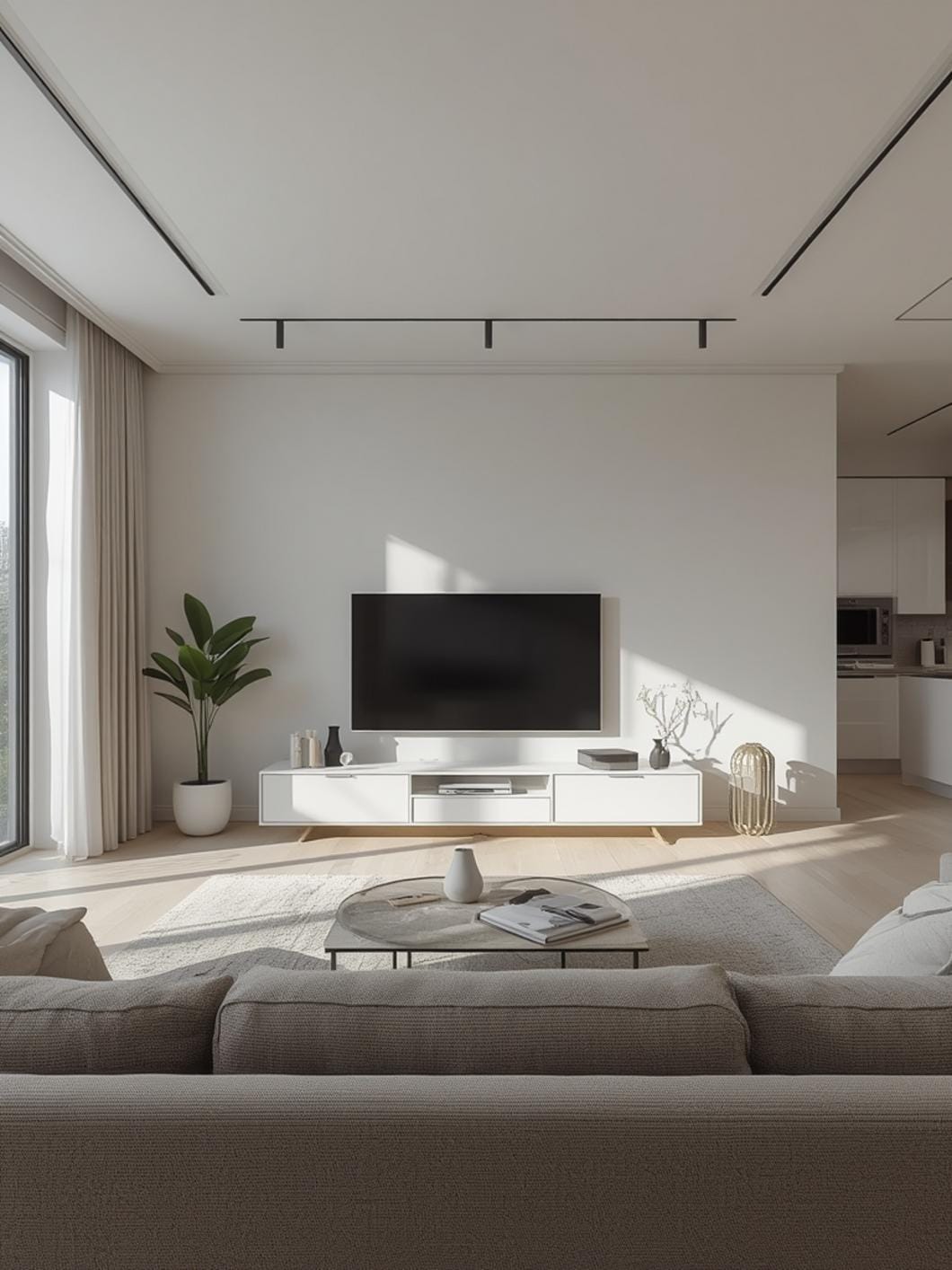
Mount your TV on the wall and add floating shelves on either side for a balanced, modern look. This approach works beautifully in smaller spaces because it keeps the floor clear and makes the room feel larger. Place your streaming devices and gaming consoles on the shelves, using small decorative boxes to hide any visible cords.
Design a Gallery Wall Around Your Screen
Instead of letting your TV dominate the room, incorporate it into a gallery wall with artwork and family photos. This makes the screen feel like part of your decor rather than the only focal point. When the TV is off, your wall still looks intentional and styled.
Build a Cozy Corner Entertainment Nook
If your living room layout allows, position your TV in a corner with angled seating that creates an intimate viewing area. Add a corner media stand that maximizes space efficiency, and you’ll create a dedicated entertainment zone that doesn’t take over the entire room.
Go Minimalist with Hidden Components
Choose a media console with closed cabinets that completely hide your components when not in use. Pair this with cable management systems that route everything behind the wall or through the furniture itself. The result is a clean, almost Scandinavian aesthetic that feels calm and uncluttered.
Embrace the Frame TV Concept
Modern frame TVs display artwork when not in use, but you can achieve a similar effect with any TV by mounting it in a custom frame or surrounding it with decorative molding. This idea works especially well in traditional or transitional spaces where a black rectangle feels out of place.
The best TV size for living room dimensions really matters here—measure your viewing distance before buying. As a general rule, divide your viewing distance in inches by two to find your ideal screen size. For example, if you sit 96 inches away, a 48-inch screen is perfect.
Layer Your Lighting for Atmosphere
Install LED bias lighting behind your TV to reduce eye strain and create a subtle glow that makes viewing more comfortable. Add smart bulbs in nearby lamps that you can dim during movies, and suddenly your living room feels like a private cinema.
Create Symmetry with Built-In Style Shelving
Flank your TV with matching bookcases or shelving units that ground the screen and provide storage for media, books, and decor. This built-in look can be achieved with standalone units positioned carefully, and it gives your electronics upgrade a custom, high-end appearance without the custom price tag.
Benefits of Upgrading Your Living Room Electronics
The most immediate benefit you’ll notice is picture quality. Modern TVs offer clarity that makes you feel like you’re part of the action, whether you’re watching nature documentaries or action movies. Colors look richer, details sharper, and dark scenes actually show detail instead of murky shadows.
Sound quality transforms your viewing experience even more than you might expect. A proper sound system brings dialogue clarity that means no more constantly adjusting volume or asking “what did they say?” It also creates spatial audio that makes movies and shows more immersive without being overwhelming.
Smart features simplify your entertainment life in ways you’ll appreciate daily. Voice control means you can adjust settings without hunting for remotes. Streaming integration puts all your content in one place, and screen mirroring lets you share photos and videos from your phone effortlessly.
Your living room becomes a space the whole family actually wants to spend time in. Game nights become more engaging, movie marathons feel special, and even background music while cooking dinner sounds better.
Energy efficiency improves with newer electronics too. Modern TVs use significantly less power than models from even five years ago, which means your upgrade can actually reduce your electricity bill while providing better performance.
Budget-Friendly to Premium Options
Budget-Conscious Approach
Start with a quality mid-range TV in the right size for your space, and pair it with a basic soundbar that still offers significant improvement over built-in speakers. Use a smart TV’s native apps instead of buying separate streaming devices, and mount the TV yourself using a basic wall mount kit. Focus your budget on getting the screen size right rather than chasing the absolute latest technology. This approach typically runs $600-$1,200 and delivers excellent value.
Mid-Range Sweet Spot
Invest in a TV with advanced features like local dimming and high refresh rates, add a quality soundbar with a wireless subwoofer, and include a streaming device for the best app experience. Professional mounting ensures perfect placement and clean cable management. Add LED bias lighting and a universal remote for convenience. This tier costs $1,500-$3,000 and provides premium features without premium prices.
Premium Experience
Choose a large OLED or high-end LED TV with all the latest picture technology, pair it with a full surround sound system, and create custom built-ins or a media wall that integrates everything seamlessly. Include smart home integration, acoustic treatments for optimal sound, and professional calibration. This level runs $4,000-$10,000+ but creates a truly cinematic home experience.
Small Space Adaptation
In compact living rooms, consider a smaller screen paired with a compact soundbar that mounts directly under the TV. Use a corner mount that swivels to face different seating areas, maximizing your viewing options. Choose wireless speakers that don’t require running cables across small spaces, and opt for furniture with built-in cord management to keep everything tidy.
Common Mistakes to Avoid
Buying a TV That’s Too Big or Small
Many homeowners guess at screen size instead of measuring their viewing distance, resulting in eyestrain or disappointment. Before shopping, measure how far you’ll sit from the screen and use that to calculate the right size—your neck and eyes will thank you.
Mounting Too High
Positioning your TV above the fireplace or too high on the wall forces you to crane your neck during viewing. The center of your screen should be at eye level when you’re seated, which is typically lower than most people’s first instinct.
Ignoring Sound Quality
Spending hundreds on a beautiful TV but relying on its built-in speakers means you’re only getting half the experience. Even an affordable soundbar makes dialogue clearer and creates the immersive experience modern content is designed for.
Neglecting Cable Management
Leaving cords visible and tangled ruins the clean look you’re trying to achieve with new electronics. Plan for cable management from the start using cord covers, raceways, or in-wall solutions that keep everything hidden and organized.
Skipping the Surge Protector
Plugging expensive electronics directly into wall outlets leaves them vulnerable to power surges that can cause permanent damage. Use a quality surge protector with enough outlets for all your components—it’s cheap insurance for your investment.
Keeping Your Setup Running Smoothly
Dust your TV screen weekly using a microfiber cloth designed for electronics. Never spray cleaner directly on the screen—mist the cloth lightly if needed. Regular dusting prevents buildup that dulls picture quality and makes your setup look neglected.
Clean your sound system speakers monthly by gently vacuuming or dusting the grilles. This prevents dust from affecting sound quality and helps your system last longer.
Update your TV and streaming device software regularly. These updates often improve performance, fix bugs, and sometimes add new features. Most devices can update automatically, so enable that setting and let them maintain themselves.
Check cable connections every few months to ensure nothing has come loose. A loose HDMI cable can cause flickering or signal loss, and it takes just seconds to check and tighten connections.
Adjust your TV’s picture settings seasonally. Rooms have different lighting in summer versus winter, and tweaking brightness and contrast helps maintain optimal picture quality year-round. Most TVs have preset modes for different lighting conditions.
Keep remote controls in a designated spot using a decorative tray or basket. This prevents the frustrating search when you want to watch something and keeps batteries from dying in remotes lost between couch cushions.
Make Your Living Room the Heart of Your Home
Upgrading your living room electronics isn’t about keeping up with technology trends—it’s about creating a space where you love spending time. The right setup makes everyday moments special, from weeknight TV watching to weekend movie marathons with friends.
Focus on choosing components that fit your space properly, sound amazing, and work together seamlessly. Your living room should feel welcoming and functional, with technology that enhances your lifestyle rather than complicating it.
Ready to explore more ways to make your living room amazing? Browse DecorKingdom for inspiration and practical advice that helps you create the home you’ve always wanted.
FAQs
How far should I sit from my TV based on screen size?
For optimal viewing comfort, multiply your TV’s screen size by 1.5 to get the minimum viewing distance in inches. For a 55-inch TV, that’s about 82 inches or roughly 7 feet away. You can sit farther back without issues, but sitting closer can cause eyestrain and make you more aware of individual pixels.
Do I really need a soundbar if my TV has decent built-in speakers?
Even TVs marketed as having good built-in speakers can’t match the clarity and depth of a separate sound system. TV speakers point backward or downward and lack the space for proper audio components. A soundbar dramatically improves dialogue clarity and creates the immersive sound that modern shows and movies are designed around.
What’s the actual difference between 4K and 8K TVs for regular living rooms?
For most living room sizes and viewing distances, 4K provides excellent picture quality that looks crisp and detailed. 8K offers more pixels, but you need a very large screen or very close seating to see the difference. Focus on other picture quality features like HDR and local dimming instead—they’ll improve your viewing experience more noticeably than extra resolution.
How can I reduce glare on my TV screen during the day?
Position your TV perpendicular to windows rather than directly across from them, and add bias lighting behind the screen to reduce contrast between the bright screen and darker wall. Consider blackout curtains or shades for windows that create unavoidable glare, and avoid placing your TV where direct sunlight hits the screen during peak viewing times.
Is it worth getting a smart TV or should I use a separate streaming device?
Smart TVs are convenient and work well, but separate streaming devices often offer faster performance, more frequent updates, and better app selection. If you’re keeping your current TV, a streaming device is an affordable upgrade. If buying a new TV anyway, the built-in smart features work fine for most people, and you can always add a streaming device later if needed.
—
Meta Title: Electronics Upgrade for Living Room: Complete 2026 Guide
Meta Description: Create your perfect entertainment space with this Electronics Upgrade for Living Room guide. Get screen sizing tips and styling ideas today.